Move your notes to a new device
Move your notes to a new phone or tablet with Notewise Cloud or Notewise Classic.
How you move your notes depends on whether you use Notewise Cloud.
If you use Notewise Cloud
Your notes are stored in your Notewise Cloud account, so you don't need to move any files.
- On your old device, wait until the cloud indicator shows that everything is synced.
- On your new device, install Notewise and sign in with the same Google, Apple, or Microsoft account. Your notes download automatically.
Your Notewise Cloud plan follows your account, so this also works when you move between Android and iPad. Don't use Force Sign Out on the old device, because changes that have not synced may be lost. See What happens after I sign out?
If you use Notewise Classic
Classic notes are stored only on your device, so you move them yourself.
Export your notes on the old device.
- Classic Unlimited: select all your notes on the home screen and export them as one ZIP file. See How to export multiple notes at once.
- Classic Free: export each note in Notewise format, one at a time.
Move the files to the new device. Use any method you like, such as Google Drive, OneDrive, Dropbox, iCloud Drive, or a USB cable. See How to transfer files between a Windows PC and the Notewise app.
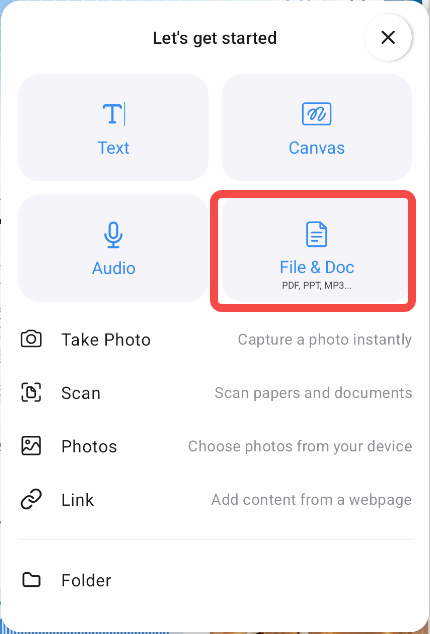
Import the files on the new device. In Notewise, tap + on the home screen, tap File & Doc, and choose the file. You can also open the file from your device's file manager and choose Notewise, or share it to Notewise.
Restore Classic Unlimited. See Activate Notewise Classic Unlimited on a different device. Classic Unlimited cannot be moved between Android and iOS.
Check before you reset or uninstall. Make sure your notes open on the new device first. Uninstalling Notewise, clearing its data, or a factory reset deletes Classic notes that were not exported, and Notewise Support cannot recover them.
Was this helpful?
Still need help? Ask the team